Mobile Battery Calibration & Fixes | 11 Expert Fixes
Fix battery drain, sudden shutdowns & wrong percentage with proven mobile battery calibration methods and expert optimization tips

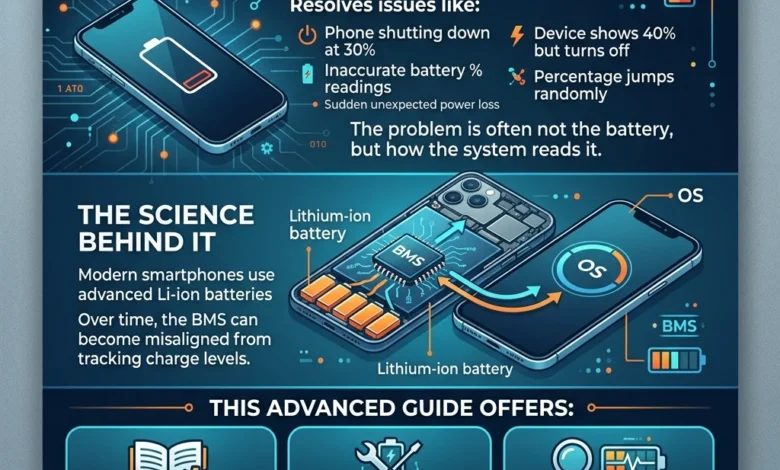
Mobile Battery Calibration & Fixes is the most effective way to resolve issues like your phone shutting down at 30%, inaccurate battery percentage readings, or sudden unexpected power loss. If your device shows 40% battery but turns off, or the percentage jumps randomly, the problem is often not the battery itself but how the system reads it.
Modern smartphones use advanced lithium-ion batteries managed by a Battery Management System (BMS) that tracks charge levels using internal data. Over time, this system can become misaligned, leading to incorrect battery readings, erratic drain, or inconsistent charging behavior.
In this advanced guide, you’ll learn the real science behind battery calibration, proven methods to fix inaccurate readings, and how to determine whether your issue is software-related or a sign of actual battery degradation so you can fix the problem without unnecessary replacements.
Mobile Battery Calibration & Fixes is the process of correcting inaccurate battery percentage readings on your phone. It works by resetting the battery’s charge tracking system so it can display the correct power level.
To calibrate your mobile battery:
- Drain the battery to 0% until the phone turns off
- Charge it to 100% without interruption
- Keep charging for an extra 1–2 hours
- Restart the device and use it normally
This method helps fix issues like sudden shutdowns, wrong battery percentage, and inconsistent charging behavior, but it does not improve actual battery health or capacity.
Why Does My Phone Shut Down at 30% Battery.? (Real Causes Explained)
If your phone shuts down at 30%, 20%, or even 40% battery, you’re not alone this is one of the most common and frustrating smartphone issues. The good news? In many cases, the problem isn’t the battery itself, but how your phone calculates and reports battery percentage.
Incorrect Battery Percentage (Calibration Issue)
Your phone doesn’t directly “see” the battery percentage. Instead, it relies on a system called the Battery Management System (BMS), which estimates remaining power based on voltage, usage patterns, and charge cycles.
Over time, this system can lose accuracy, leading to:
- Battery percentage jumps (e.g., 40% → 15%)
- Phone dies suddenly at 30%
- Erratic battery drain
This is where battery calibration or recalibration becomes important it helps realign the system’s readings with actual battery capacity.
Capacity Deterioration (Battery Aging)
All lithium-ion batteries degrade over time. After around 400–1,200 charge cycles, the battery can no longer hold its original capacity.
What this means:
- Your phone may show 30%, but actual capacity is much lower
- Voltage drops faster under load
- Device shuts down unexpectedly to prevent damage
This is not a calibration issue this is natural battery wear.
Voltage Drop vs. Real Capacity (Hidden Problem)
Battery percentage is calculated using voltage readings, but voltage doesn’t always reflect real battery capacity especially in older batteries.
When your phone performs heavy tasks (gaming, camera, apps), the voltage can suddenly drop, causing:
- Instant shutdowns
- Battery percentage misreading
- Device instability
This is why your phone might die even when it shows remaining battery.
Software Glitches & Updates
Sometimes the issue starts after a system update.
Common problems:
- Battery drains quickly after update
- Battery percentage becomes inaccurate
- Charging behavior becomes inconsistent
Updates can reset or confuse the battery calibration data, leading to temporary misalignment.
When It’s a Hardware Problem
Not all shutdown issues are fixable with calibration.
Watch out for:
- Phone shutting down even at high battery levels repeatedly
- Battery swelling or overheating
- Extremely fast battery drain
In these cases, the battery may need replacement.
Quick Summary
If your phone dies at 30%, the most likely causes are:
- Incorrect battery calibration (fixable)
- Battery degradation (normal aging)
- Voltage instability under load
- Software-related issues after updates
Understanding the root cause is critical because calibration can fix software misreading, but not physical battery damage.
What Is Mobile Battery Calibration & Recalibration.? (Myth vs Reality)
Understanding battery calibration vs recalibration is critical before trying to fix battery issues. Most users believe calibration “repairs” the battery but in reality, it only helps your phone read the battery correctly, not improve its physical condition.
Battery Calibration vs Recalibration (What’s the Difference?)
Battery calibration is the process of aligning your phone’s battery percentage with its actual charge level. Over time, your device may show incorrect readings due to data mismatch.
Battery recalibration, on the other hand, refers to repeating this process when the system becomes inaccurate again usually after updates or prolonged usage.
Simple truth:
- Calibration = fixing reading errors
- NOT fixing battery health
Role of the Battery Management System (BMS)
Every smartphone uses a Battery Management System (BMS) a built-in system that monitors:
- Battery percentage
- Charging cycles
- Voltage levels
- Temperature
The BMS estimates how much battery is left using internal calculations, not direct measurement.
Over time, this system can become misaligned, leading to:
- Incorrect battery percentage
- Sudden shutdowns
- Inconsistent charging behavior
Calibration helps the BMS “relearn” the correct battery range.
Fuel Gauge & Battery Readings (The Real Science)
Inside your phone, a component called the fuel gauge tracks how much energy flows in and out of the battery. This process is often based on coulomb counting (measuring electrical charge flow).
However, this system is not perfect.
Problems occur when:
- Usage patterns change
- Battery ages
- Software resets occur
Result:
- Battery percentage becomes unreliable
- Phone may show 40% but actually has much less usable power
This is why calibration becomes necessary not to fix the battery, but to fix the data interpretation.
Does Battery Calibration Actually Fix Battery Issues.?
Short answer: Sometimes but only for software-related problems.
Calibration can fix:
- Battery percentage jumps
- Phone dying at 30% (if caused by misreading)
- Inconsistent battery readings
Calibration CANNOT fix:
- Battery degradation
- Reduced capacity
- Physical damage or swelling
The Biggest Myth (Important for Trust)
Many users believe:
“Battery calibration improves battery life”
Reality:
Calibration only improves accuracy, not performance.
If your battery is old or degraded, calibration won’t magically restore it.
Key Takeaway
Battery calibration is not a repair tool it’s a correction tool.
- If your issue is incorrect readings → calibration works
- If your issue is battery wear → replacement needed
Understanding this difference saves you time, money, and frustration.
Why Smartphone Batteries Fail (Science Behind Lithium-Ion Batteries)
To truly understand Mobile Battery Calibration & Fixes, you need to know one thing: most battery problems are not software bugs they’re the result of natural chemical aging inside your phone’s battery.
Modern smartphones use lithium-ion (Li-ion) and lithium-ion polymer (Li-Po) batteries. These batteries are powerful and efficient, but they are not permanent they degrade over time due to internal chemical reactions.
Lithium-Ion & Li-Po Batteries (How They Work)
Lithium-ion batteries store energy by moving lithium ions between two electrodes:
- Anode (negative side)
- Cathode (positive side)
When you charge your phone, ions move in one direction. When you use it, they move back.
Li-Po batteries are a slightly improved version:
- More flexible design
- Better safety profile
- Common in modern smartphones
But both types share one limitation: they wear out over time.
Charge Cycles (400–1,200 Lifespan Explained)
A charge cycle means using 100% of your battery whether in one go or multiple partial charges.
Example:
- 50% → 100% + 50% → 100% = 1 full cycle
Most smartphone batteries are designed for:
400 to 1,200 charge cycles
After this:
- Battery capacity drops
- Performance becomes unstable
- Shutdown issues become common
This is why older phones often show battery problems even after calibration.
Capacity Deterioration Over Time
Battery capacity deterioration means your battery can no longer store as much energy as it used to.
For example:
- New battery = 100% capacity
- After aging = 70–80% capacity
But here’s the problem:
Your phone may still show 100%, even though actual capacity is lower.
This mismatch causes:
- Incorrect battery percentage
- Faster drain
- Sudden shutdowns
This is where calibration helps but only to adjust readings, not restore capacity.
Electrode Degradation & Side Reactions
Inside every battery, tiny chemical reactions happen during charging and discharging.
Over time:
- Electrodes start to degrade
- Internal resistance increases
- “Side reactions” reduce efficiency
These side reactions:
- Consume usable energy
- Generate heat
- Reduce battery lifespan
This is why:
- Older batteries drain faster
- Phones heat up more
- Performance becomes inconsistent
Hidden Factor: Voltage vs Real Capacity
Your phone estimates battery using voltage readings, but voltage doesn’t always reflect true capacity especially in aged batteries.
Under heavy use:
- Voltage drops quickly
- Phone thinks battery is empty
- Device shuts down unexpectedly
Even if percentage shows 30%
Key Takeaway
Smartphone batteries don’t “break” suddenly they gradually degrade due to:
- Charge cycles
- Chemical wear
- Internal resistance
Calibration can fix reading errors, but it cannot stop chemical aging.
Understanding this difference is what separates guesswork from real solutions.
Signs Your Battery Needs Calibration (Not Replacement Yet)
Before replacing your battery, it’s important to identify whether the issue is actually hardware-related or just inaccurate system readings. In many cases, users assume the battery is damaged when in reality, it’s a calibration issue causing incorrect battery behavior.
If your device shows the following signs, your battery may need recalibration, not replacement.
Battery Drains Quickly After Update
One of the most common issues occurs right after a software update.
You may notice:
- Battery dropping faster than usual
- Sudden percentage changes
- Increased background activity
This happens because updates can reset or confuse the battery management system (BMS), leading to temporary misalignment.
In this case, battery calibration can help restore accurate readings.
Inconsistent Charging Times
If your phone sometimes charges normally and other times behaves unpredictably, it’s a strong sign of calibration issues.
Examples:
- Charging too fast up to 80%, then slowing down drastically
- Stuck at a certain percentage for a long time
- Charging speed varies without reason
These inconsistencies often mean the system is struggling to correctly interpret battery data.
Fake or Inaccurate Battery Percentage Readings
This is the clearest sign your battery needs calibration.
You might see:
- Battery stuck at 100% for too long
- Sudden drops (e.g., 50% → 20%)
- Phone shutting down while showing remaining charge
This happens when the system’s fuel gauge data becomes inaccurate, causing a mismatch between displayed percentage and actual battery level.
Calibration helps realign these readings.
Phone Charges Slowly in the Last 20%
It’s normal for charging to slow down near 100%, but excessive slowdown can indicate calibration issues.
Signs include:
- Stuck between 80%–100% for a long time
- Charging feels inconsistent near full battery
- Device heats slightly during final charging stage
This often happens because the system is trying to adjust for incorrect charge estimation.
When It’s NOT a Calibration Issue
Not every battery issue can be fixed with calibration.
If you notice:
- Battery swelling
- Phone overheating frequently
- Extremely fast drain even after calibration
- Device shutting down repeatedly at high percentages
Then it’s likely a hardware issue, and battery replacement may be necessary.
Quick Decision Guide
You likely need battery calibration if:
- Battery percentage is inaccurate
- Charging behavior is inconsistent
- Issues started after an update
You likely need a battery replacement if:
- Battery drains extremely fast
- Device overheats or swells
- Performance keeps getting worse over time
Method 1 – Full Cycle Battery Calibration (Step-by-Step Safe Method)
The full cycle battery calibration method is the most commonly recommended way to fix incorrect battery percentage and sudden shutdown issues. It works by helping your phone’s Battery Management System (BMS) reset its understanding of your battery’s actual charge range.
Important: This method should be used only when needed, not as a regular habit.
Step 1: Drain Battery to 0%
Use your phone normally until the battery drops to 0% and the device turns off automatically.
Tips:
- Avoid forcing shutdown manually
- Let the battery drain naturally
- Do not recharge before it fully powers off
This step helps trigger the system’s full discharge flag, which marks the lowest battery point.
Step 2: Charge to 100% (Then Wait 1–2 Extra Hours)
Now plug in your phone and charge it all the way to 100% without interruption.
Once it reaches 100%:
- Keep it plugged in for an additional 1–2 hours
- Avoid using the phone during this time
This ensures the system registers the true full charge level and sets the full charge flag correctly.
Step 3: Restart & Use Normally
After charging:
- Restart your phone
- Unplug the charger
- Start using the device normally
At this point, the system recalibrates how it tracks battery percentage.
What Happens Internally (Important Insight)
During this process:
- The fuel gauge resets its reference points
- The system relearns battery limits (0% → 100%)
- Voltage readings are realigned with actual capacity
This improves:
- Battery percentage accuracy
- Charging consistency
- Shutdown behavior
When NOT to Use Full Cycle Calibration
This method is helpful but overusing it can actually harm your battery.
Avoid doing this if:
- Your battery is already healthy
- You recently calibrated your device
- You perform this monthly (not recommended)
Deep discharging frequently increases battery wear and accelerates capacity deterioration in lithium-ion batteries.
Pro Tip
Instead of repeating full cycles:
- Use this method only when you notice inaccurate battery readings
- Follow it occasionally not regularly
For daily use, partial charging (20%–80%) is much healthier for long-term battery life.
Quick Result Expectation
After proper calibration, you should notice:
- Stable battery percentage (no sudden drops)
- More accurate charging behavior
- Reduced unexpected shutdowns
If the issue continues, the problem is likely hardware-related, not calibration.
Method 2 – Safe Battery Recalibration Without Deep Discharge
While the full cycle method works, modern lithium-ion batteries don’t require frequent deep discharges. In fact, repeatedly draining your battery to 0% can accelerate wear.
That’s why experts now recommend a safe battery recalibration method one that improves accuracy without damaging long-term battery health.
Partial Charging Cycles (The Healthy Method)
Instead of full 0% → 100% cycles, use partial charging cycles, which are much safer for daily use.
Best practice:
- Keep battery between 20% and 80%
- Avoid frequent deep discharges
- Charge in shorter intervals instead of one long session
This method reduces stress on the battery while allowing the system to gradually adjust its readings.
Safe Mode Calibration (Hidden Trick)
Sometimes battery drain or incorrect readings are caused by third-party apps, not the battery itself.
To test this:
- Boot your phone into Safe Mode
- Use it for a few hours
- Monitor battery behavior
If battery performance improves:
The issue is likely caused by apps, not calibration
This helps isolate software problems without risking battery health.
Avoid Overcharging Myths
Many users believe:
“Leaving your phone plugged in overnight improves calibration”
Reality:
- Modern phones stop charging at 100% automatically
- Overcharging is mostly prevented by the system
- Keeping the phone at 100% for long periods can still generate heat
Best approach:
- Unplug once fully charged (when possible)
- Avoid excessive heat during charging
Real-World Safe Recalibration Strategy
For long-term performance, follow this balanced approach:
- Occasionally let battery drop below 15–20%
- Charge to 100% once in a while (not daily)
- Use partial cycles for daily charging
- Restart your phone weekly to refresh system processes
This allows the Battery Management System (BMS) to maintain accurate readings without stressing the battery.
Why This Method Works Better
Modern smartphones rely on smart battery algorithms, not just fixed calibration points.
By using safe charging habits:
- The system continuously adjusts battery readings
- You avoid unnecessary charge cycles
- Battery lifespan remains longer
Key Takeaway
You don’t need aggressive calibration to fix battery issues.
- Use full cycle calibration only when necessary
- Rely on safe recalibration habits for daily use
This approach gives you the best of both worlds:
Accurate battery readings
Longer battery lifespan
How to Check Real Battery Health & Detect Fake Readings
One of the biggest mistakes users make is trusting the battery percentage shown on their phone. In reality, that number doesn’t always reflect your battery’s true condition.
To properly apply Mobile Battery Calibration & Fixes, you must understand the difference between battery health vs displayed percentageand how to detect misleading or even fraudulent readings.
Battery Health vs Battery Percentage (Critical Difference)
Battery percentage (e.g., 50%) only shows remaining charge, not the battery’s actual condition.
Battery health, however, reflects:
- Total capacity compared to original
- Internal resistance
- Ability to hold charge over time
Example:
- Phone shows 100% battery
- But real capacity = only 70% of original
Result:
- Faster drain
- Sudden shutdowns
- Inaccurate readings
This is why calibration fixes percentage errors, but not battery health.
Voltage Readings vs Actual Capacity
Your phone estimates battery level using voltage readings, but voltage alone can be misleading especially in aging batteries.
What happens:
- Voltage may appear stable
- But actual stored energy is lower
- Under load (gaming, apps), voltage drops quickly
This leads to:
- Phone dying at 30%
- Random shutdowns
- Erratic battery behavior
This mismatch is one of the main reasons behind incorrect battery readings.
Detect Fraudulent Battery Health (Reseller Trick)
Here’s something most guides don’t tell you:
Some sellers manipulate battery readings to make a device look “healthy.”
Common tricks:
- Resetting system stats before selling
- Using software to fake battery health values
- Replacing battery with low-quality cells
Signs of fake battery health:
- Phone shows “good health” but drains very fast
- Battery percentage drops abnormally
- Charging behavior feels inconsistent
This is especially common in refurbished or used devices.
Tools to Check Real Battery Health
To get accurate insights, you need third-party diagnostic tools.
Recommended Apps:
- AccuBattery
- Battery Guru
These tools help you monitor:
- Real battery capacity (mAh)
- Charge/discharge speed
- Battery wear level
- Charging patterns
After a few charge cycles, these apps give a much clearer picture than default system readings.
Pro Tip
Don’t rely on one reading.
For best accuracy:
- Monitor battery performance over 2–3 days
- Compare charging speed and drain patterns
- Check consistency across different usage scenarios
Key Takeaway
To properly diagnose battery issues:
- Battery percentage ≠ battery health
- Voltage ≠ real capacity
- System readings can be inaccurate or manipulated
Always verify with real usage data and trusted tools before deciding to calibrate or replace your battery.
Fix Battery Drain & Charging Issues (Proven Optimization Fixes)
After understanding Mobile Battery Calibration & Fixes, the next step is solving real-world problems like fast battery drain, inconsistent charging, and performance drops.
In many cases, these issues are not caused by battery failure but by software behavior, apps, and charging habits.
Battery Drains Quickly After Update (Fix It Fast)
Battery issues often appear after system updates because:
- Background processes reset
- Apps become unoptimized
- System re-indexes data
Quick fixes:
- Restart your phone after update
- Update all apps from the app store
- Wait 24–48 hours (system stabilizes)
- Recalibrate battery if percentage feels inaccurate
If drain continues beyond 2–3 days, it’s likely a deeper issue.
Background Apps & System Drain
Many apps run silently in the background, consuming battery without you noticing.
Common culprits:
- Social media apps
- Location services
- Sync services (email, cloud backup)
Fix:
- Go to Battery Usage settings
- Identify high-drain apps
- Restrict background activity
- Disable unnecessary permissions
This alone can significantly reduce erratic battery drain.
Inconsistent Charging Speed (Why It Happens)
If your phone charges fast sometimes and slow at other times, it could be due to:
- Temperature fluctuations
- Charging cable quality
- Background usage while charging
Fix:
- Avoid using phone during charging
- Charge in a cool environment
- Use airplane mode for faster charging
- Replace low-quality cables
Charging speed is dynamic not fixed.
Original Charger vs Fast Charging Impact
Using the right charger makes a big difference.
Important points:
- Original chargers provide stable power delivery
- Cheap chargers can cause inconsistent charging
- Fast charging generates more heat
Best practice:
- Use manufacturer-approved charger
- Avoid overheating during fast charging
- Don’t rely on fast charging all the time
Heat is one of the biggest enemies of battery health.
Combine Optimization + Calibration (Best Results)
For best performance:
- Fix background drain issues
- Follow safe charging habits
- Then apply calibration if needed
This combination ensures:
Accurate battery readings
Stable performance
Longer battery lifespan
Key Takeaway
Most battery problems are not caused by the battery itself—but by:
- Software updates
- Background apps
- Charging habits
Fix these first, and then use battery calibration only when necessary for accurate readings.
Do Battery Calibration Apps Really Work.? (Truth Revealed)
If you search for battery calibration, you’ll find dozens of apps claiming to “fix battery health,” “boost performance,” or “repair battery issues.”
But here’s the truth:
Most battery calibration apps do not actually calibrate your battery.
Understanding this can save you from wasting time and potentially damaging your device.
Why Calibration Apps Are Ineffective
Battery calibration is not something apps can directly control.
Here’s why:
- Calibration happens at the system (OS) level, not app level
- Apps cannot modify the Battery Management System (BMS)
- They don’t have access to real battery calibration data
Most apps simply:
- Clear temporary files
- Show battery stats
- Simulate optimization
They do NOT recalibrate your battery’s actual readings.
Risks of Fake or Misleading Apps
Some apps go beyond being useless they can actually harm your device.
Common risks:
- Excessive ads and background activity (more battery drain)
- Fake “boost” features that do nothing
- Data privacy concerns
- Malware in untrusted apps
Ironically, many of these apps increase battery drain instead of fixing it.
System-Level Limitations (The Real Reason)
Modern smartphones tightly control battery behavior through:
- Battery Management System (BMS)
- Firmware-level controls
- Hardware sensors
Third-party apps cannot override these systems.
That means:
- No app can “repair” battery health
- No app can fix capacity deterioration
- No app can truly recalibrate battery readings
What Actually Works Instead
Instead of relying on apps, use proven methods:
- Perform manual calibration (when needed)
- Follow safe charging practices (20%–80%)
- Fix background app drain
- Use diagnostic tools (not “fix” apps)
- Replace the battery if it’s degraded
These are real solutions not shortcuts.
Pro Insight
If an app claims:
- “Increase battery capacity”
- “Fix battery health instantly”
- “Calibrate battery with one tap”
It’s a red flag.
Real battery optimization requires system-level behavior + user habits, not one-click fixes.
Key Takeaway
Battery calibration apps are mostly:
Ineffective
Misleading
Sometimes harmful
The best approach is manual calibration + smart usage habits.
When Calibration Doesn’t Work (Hardware Failure Signs)
Not all battery problems can be fixed with Mobile Battery Calibration & Fixes. If your battery is physically degraded or damaged, calibration will not solve the issue because the problem is no longer about inaccurate readings, but actual hardware failure.
Knowing these signs can help you avoid wasting time on repeated calibration attempts and move directly to the right solution.
Battery Swelling (Serious Danger Sign)
Battery swelling is one of the most critical warning signs.
You may notice:
- Back panel slightly bulging
- Screen lifting from edges
- Device feels thicker than usual
This happens due to internal gas buildup from chemical breakdown inside the battery.
Important:
- Stop using the device immediately
- Do NOT attempt calibration
- Replace the battery as soon as possible
Device Overheating During Normal Use
If your phone heats up excessively during basic tasks like browsing or charging, it could indicate internal battery damage.
Common causes:
- Increased internal resistance
- Chemical degradation
- Faulty charging cycles
Overheating not only affects performance but also accelerates battery deterioration.
Capacity Drop After Charge Cycles
As discussed earlier, lithium-ion batteries degrade after 400–1,200 charge cycles.
Signs of capacity loss:
- Battery drains much faster than before
- You need to charge multiple times a day
- Battery percentage drops quickly even after calibration
At this stage, the battery can no longer hold sufficient charge.
Repeated Calibration Doesn’t Fix the Issue
If you’ve already tried:
- Full cycle calibration
- Safe recalibration methods
- Optimization fixes
And the problem still exists:
It’s likely not a software issue anymore.
When to Replace an Aging Battery
You should consider battery replacement if:
- Phone shuts down repeatedly at random percentages
- Battery health is significantly reduced
- Charging behavior remains inconsistent
- Device performance is unstable
Replacing the battery will:
- Restore normal performance
- Fix sudden shutdown issues
- Improve overall user experience
Pro Tip
Before replacing:
- Verify battery health using diagnostic tools
- Check for physical signs (swelling, heat)
- Confirm calibration doesn’t fix the issue
This ensures you’re solving the real problem, not guessing.
Key Takeaway
Calibration works only for software misalignment, not hardware damage.
If your battery shows:
- Physical damage
- Severe capacity loss
- Persistent issues after calibration
The only real fix is battery replacement.
Advanced Battery Optimization & Lifespan Tips
Once you’ve applied the right Mobile Battery Calibration & Fixes, the next step is maintaining long-term battery performance. Modern smartphones are powerful, but without proper habits, even a new battery can degrade quickly.
These advanced optimization strategies will help you extend battery lifespan, maintain accuracy, and avoid future calibration issues.
20–80 Charging Rule (Golden Standard)
One of the most recommended practices for lithium-ion batteries is the 20–80 rule.
Best approach:
- Avoid dropping below 20% regularly
- Avoid staying at 100% for long periods
- Keep battery between 20%–80% for daily use
Why it works:
- Reduces stress on battery cells
- Minimizes chemical wear
- Extends total charge cycle lifespan
Temperature Extremes (Heat & Cold Damage)
Temperature plays a major role in battery health.
Avoid:
- Charging in hot environments
- Using phone under direct sunlight
- Exposure to extreme cold
Effects of heat:
- Faster electrode degradation
- Increased internal resistance
- Reduced battery lifespan
Ideal range: 0°C to 35°C (32°F to 95°F)
Battery Management System Optimization
Your phone’s Battery Management System (BMS) constantly learns from your usage patterns.
You can help it perform better by:
- Restarting your device occasionally
- Avoiding irregular charging habits
- Using consistent charging cycles
- Keeping software updated
A stable usage pattern helps the system maintain accurate battery readings over time.
Long-Term Battery Health Strategy
To get the most out of your battery:
- Use partial charging cycles daily
- Perform calibration only when needed
- Avoid unnecessary deep discharges
- Use original or high-quality chargers
- Monitor battery health periodically
Think of battery care as a long-term strategy, not a one-time fix.
Pro Insight (Advanced Users)
Battery performance is a balance between:
- Usage habits
- Charging behavior
- Environmental conditions
Even the best calibration won’t help if daily habits damage the battery.
Final Takeaway
To maximize battery lifespan:
- Follow safe charging practices (20–80 rule)
- Avoid heat and extreme conditions
- Support the system with consistent usage
- Use calibration only when necessary
This ensures:
- Accurate battery readings
- Stable performance
- Longer device lifespan
FAQs:
Q: Why does my phone shut down at 30% battery.?
This usually happens due to incorrect battery calibration or capacity degradation. Your phone may show 30%, but the actual battery charge is much lower. Calibration can fix reading errors, but if the battery is aged, replacement may be required.
Q: Does battery calibration improve battery life.?
No, this is a common myth. Battery calibration does not increase battery life or capacity. It only fixes inaccurate battery percentage readings and helps your device display the correct charge level.
Q: How often should I calibrate my phone battery.?
You should only calibrate your battery when you notice issues, such as sudden shutdowns or incorrect percentage readings. Doing it too frequently can actually reduce battery lifespan.
Q: Can calibration fix fast battery drain.?
Only in certain cases. If the drain is caused by incorrect readings, calibration may help. But if the issue is due to apps, updates, or battery aging, you’ll need optimization or replacement, not calibration.
Q: Is it safe to drain battery to 0% for calibration.?
Yes, but only occasionally. Frequent deep discharges can damage lithium-ion batteries. Use full cycle calibration sparingly, and rely on safe charging habits for daily use.
Q: Why is my battery percentage jumping suddenly.?
This happens when the battery management system (BMS) loses accuracy. Calibration helps realign the system so it can correctly track battery levels again.
Q: Do battery calibration apps really work.?
No, most apps cannot access system-level battery data. They may show stats or clear files, but they cannot truly recalibrate your battery.
Q: How can I check my real battery health.?
You can use tools like AccuBattery or Battery Guru to monitor real capacity, charge cycles, and battery wear. These provide a more accurate picture than default system readings.
Q: When should I replace my phone battery.?
You should replace your battery if:
- It drains very fast
- Phone shuts down randomly
- Battery is swollen or overheating
- Calibration does not fix the issue
Q: What is the best way to maintain battery health long-term.?
Follow these best practices:
- Keep battery between 20%–80%
- Avoid overheating
- Use original chargers
- Limit fast charging when possible
- Calibrate only when needed
Conclusion:
Mobile Battery Calibration & Fixes is not about magically improving your battery it’s about understanding how your device works and applying the right solution at the right time.
Most battery problems fall into two categories:
Software-related issues (fixable)
- Incorrect battery percentage
- Sudden shutdowns due to misreading
- Charging inconsistencies
Hardware-related issues (not fixable by calibration)
- Battery degradation
- Reduced capacity
- Physical damage or swelling
Calibration plays an important role but only when used correctly. It helps your phone’s system accurately interpret battery data, not restore lost performance.
The real key to long-term battery performance is a combination of:
- Smart charging habits (20–80 rule)
- Avoiding heat and extreme conditions
- Monitoring battery health regularly
- Using calibration only when necessary
If you follow these strategies, you won’t just fix battery issues you’ll prevent them entirely.
Also Read:
- 20 ways | How To Fix Android Phone Touch Screen Problem |
- How to Calibrate iPhone 12 | Complete Step-by-Step Guide to Fix Issues & Boost Performance
- Fixing White Balance Issues on a Top-Tier Android Handset
- Fixing Touchscreen Issues & Calibration on Android
- Battery Drain vs Battery Health
- How To Fix Android Battery Problems Fast
- Fix iPhone 11 Pro Max Wireless Charging Isn’t Working
- How Do I Enable Wireless Charging on My iPhone 11 Pro Max
- Does My iPhone 11 Pro Max Have Qi Charging?
- Does iPhone 11 Pro Max Have Wireless Charging
- Does iPhone 11 Have Wireless Charging.?
- How Many Battery Cycles Your iPhone Has Gone Through
- Why iphone 12 Mini Battery Drains Fast
- How to Extend iPhone 12 mini Battery Life
- The Fastest Way to Charge iPhone 12 Pro
- How To Fix iPhone 12 Overheating Issue
- How To Maintain iPhone 12 Battery Health
- How to Calibrate Samsung S22